
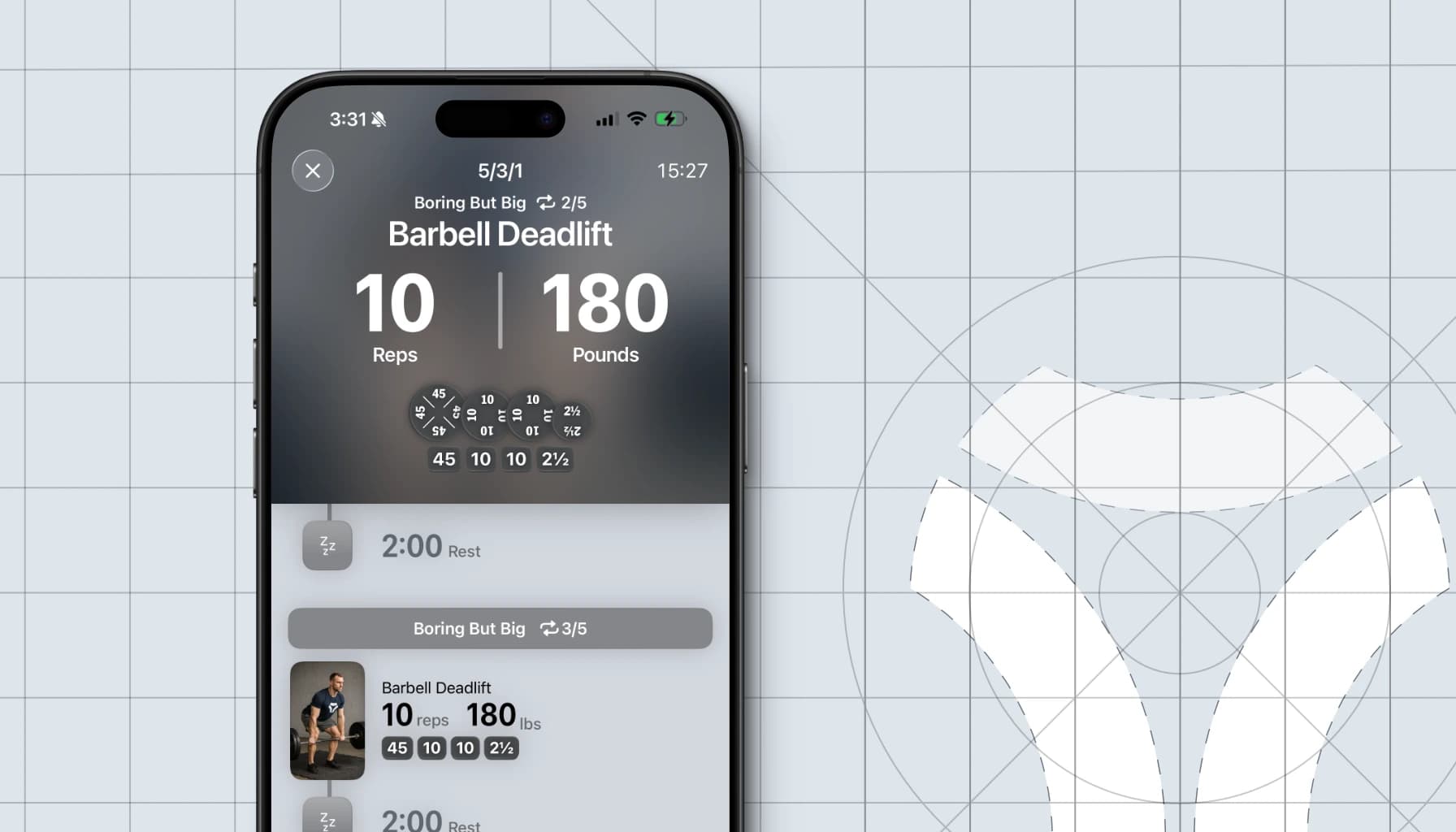
We’re building Vis because we believe strength training deserves better tools. With too many workout apps feeling like spreadsheets of sets and reps, we’ve been left wanting for something better. Something designed for the way athletes actually train, not just for how they log. Something that remains useful while your hands are on the bar, not just in between sets.
As we gear up for launch, we wanted to give a behind-the-scenes look at how Vis is designed, starting with the most important experience of all: the workout. In this post, we’ll dive into the design principles guiding this experience, the ways athletes interact with their phones while working out, and how we optimized our design for each of those interactions.
Our Design Principles
As we’ve stated before, our main gripe with most workout apps out there is that they feel like spreadsheets. We don’t hate spreadsheets. I used to work on Excel at Microsoft, after all. But spreadsheets excel at one thing: manipulating large amounts of data.
And that’s not what you need while deadlifting.
When working out, people primarily care about three things: their current set, their next set and how to mark it done. On top of that, most exercises require that you put your phone down to perform them, making the distance between your eyes and the device much greater. And the density of spreadsheets forces you to pick up your phone to read or interact with it.
And so with this in mind, we came up with the following principles to guide the design of our workout experience:
- Prioritize the most important needs
- Optimize for readability and operability at a distance
- Make it look good
With those principles in hand, we began prototyping, iterating, and observing how users interacted with their devices. What we discovered was that user interactions fit in three broad classes, which all need different UI considerations. Let’s dive into those.
Three Classes of Interactions
While users are working out, we’ve found that they’re interacting with their phone in one of three ways.
- Out of arm’s reach: reading the screen during a lift or short rest.
- At arm’s length: one-handed interactions to mark a set as done or check what’s next.
- Full focus: both-hand interactions for editing, reviewing, or rearranging workouts.
Each of these classes demand a distinct interface, not just because of physical constraints, but also because of the difference in user expectations. And this makes sense, you don’t want oversize text when you're holding your phone 12 inches from your eyes.
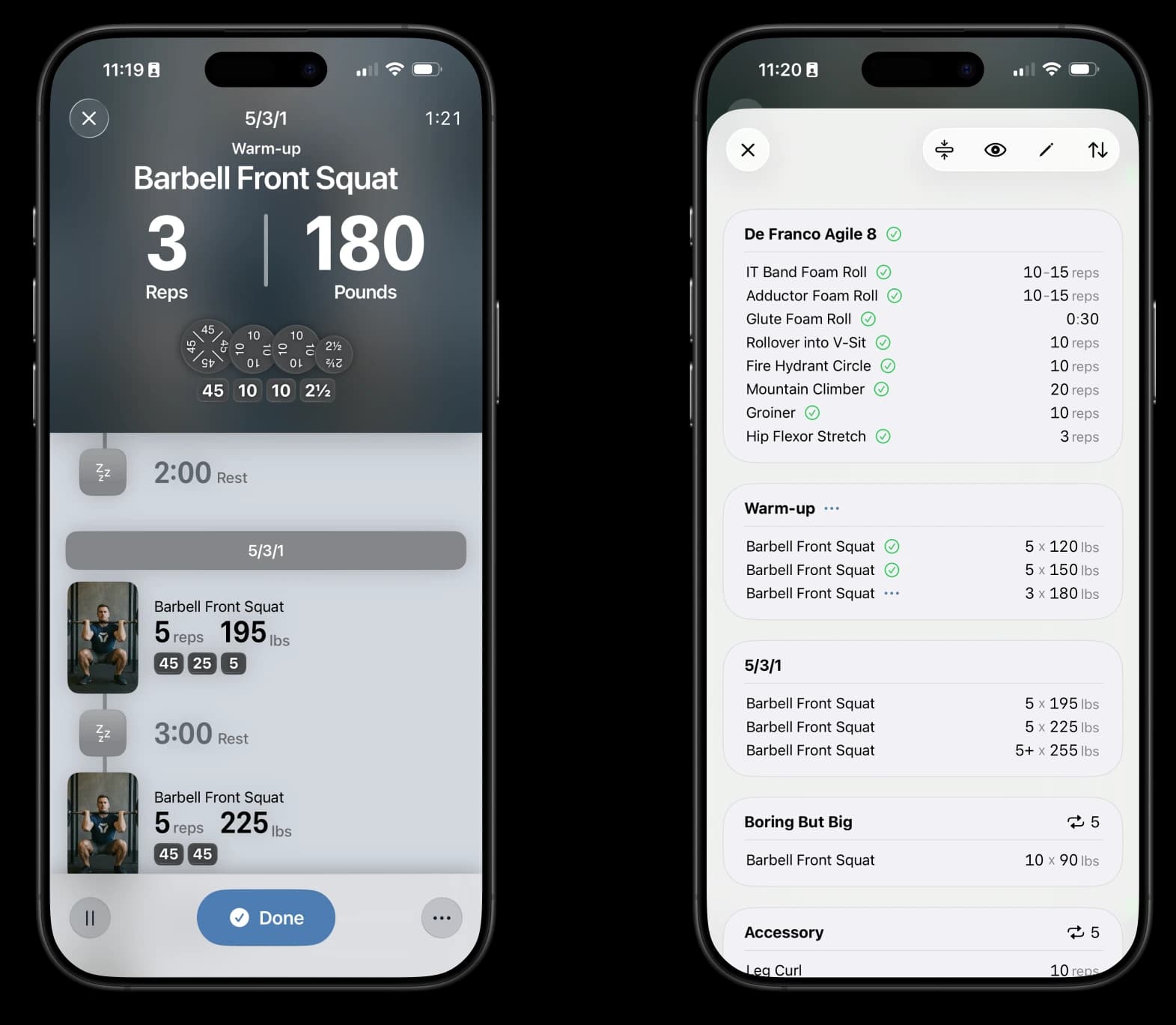
Rather than forcing one screen to cover all three classes of interaction, we optimized the main screen for the first two and moved full-focus features to a separate sheet. By splitting this into two modes, we keep the “working out” experience front and center while still enabling users to perform more involved interactions such as editing their workout.
Let’s now dive even further into how we’ve approached designing for each interaction class.
Designing for Far Field Interactions
The first class of interactions, which we also refer to as far field interactions, covers the situations where the user is either actively performing an exercise, preparing to perform an exercise or is resting between exercises (in case of a short rest). In those situations, the user is far from the device and only cares about what they’re doing right now. Users usually have their phone on the floor or on a stand and have very little mental bandwidth to spare, preferring to focus on their movement.
The information most important for the user at that moment, in order, is
- The volume (duration, number of sets, etc.) and the load (weight) for their set
- The plating if using a barbell
- The exercise they’re performing
Given that the device is often several feet away, we employed multiple techniques to make sure the information displayed could be easily processed.
Font and Layout
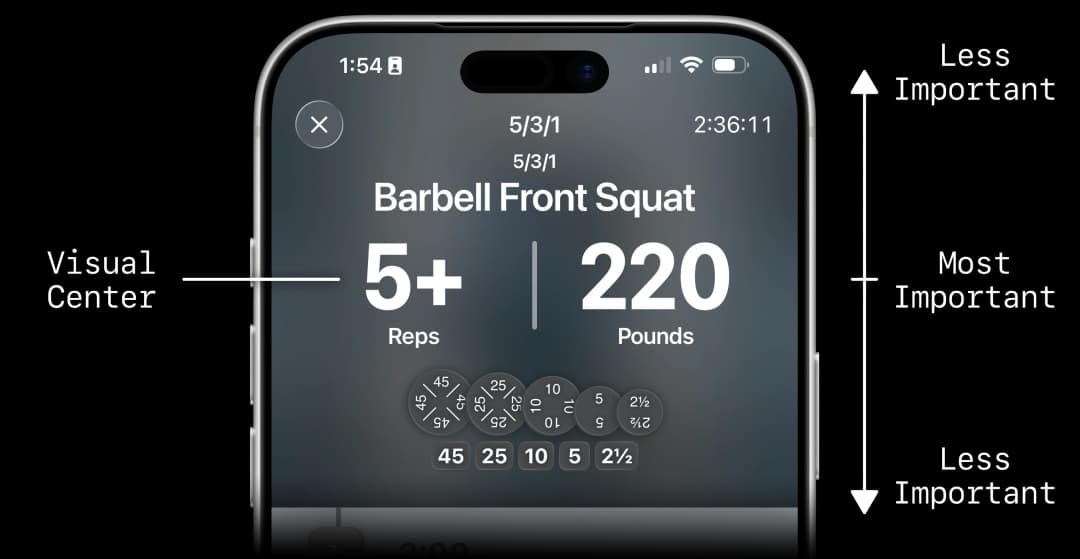
First, we made a very clear, almost physical, separation between the top and bottom of the screen to make it immediately clear that each region serves a different purpose.
Then, we supersized the font of the most important elements, the set’s volume and load, to naturally draw the user’s gaze to them. This also makes them easy to read even from far away.
We then placed this element in the middle, to give us room to expand hierarchically in both directions. We also made those elements smaller, both to preserve focus and handle their varied variance sizes (exercise names can be really long, e.g.: “Barbell Deficit Romanian Deadlift”).
Redundant Encoding
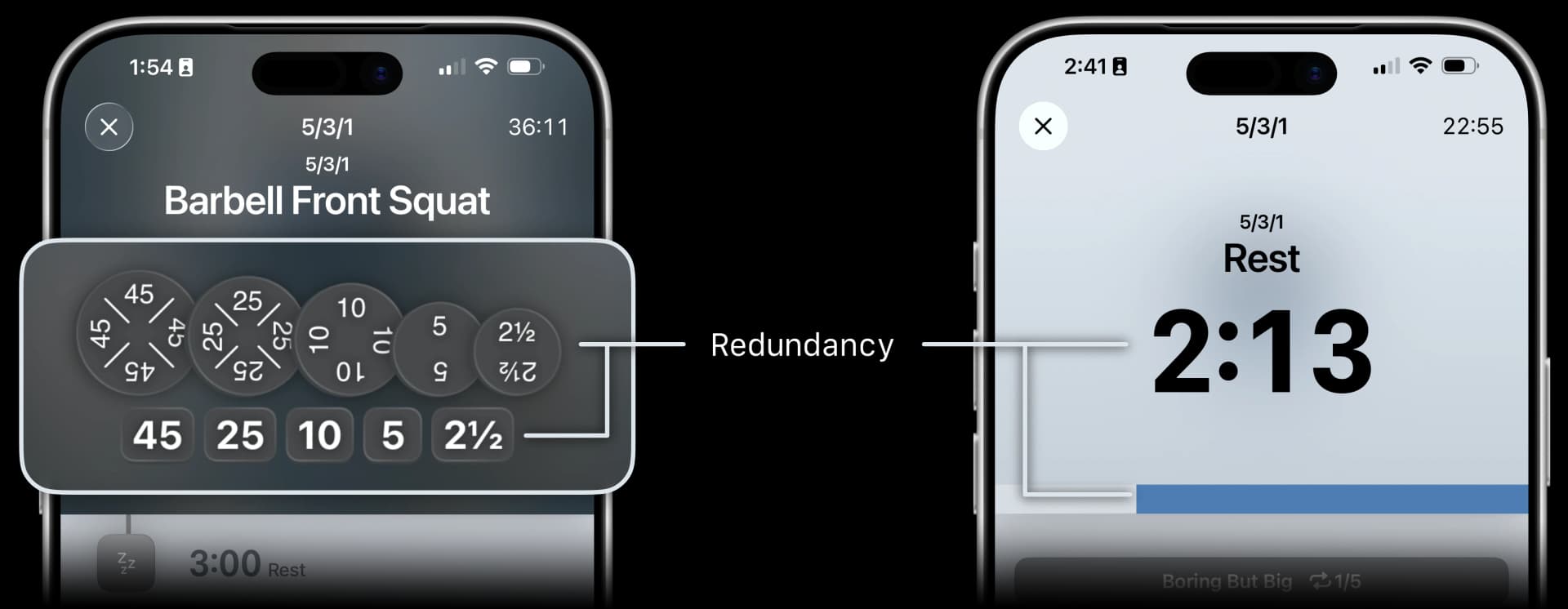
For dense elements like the plating, we use redundant encoding so that the user has a higher chance of understanding the value at a glance. Not only is the weight labeled on both a plate and “chip”, but the plates also scale accordingly. We also use redundancy for timed sets, letting users get a sense of how long they have left without reading the exact number.
All of these details add up to a screen that is easy to understand at a glance and that serves the user even while they’re actively performing a lift. Let’s now take a look at the interactions that come when the user is done with their lift.
Designing for Near Field Interactions
The second class of interactions is what we call near field interactions. The use cases covered by those interactions include marking the current set as complete, entering the amount of performed reps and looking at upcoming sets. These interactions are typically done at arms length by the user with their index while their phone is on the ground or on a stand, or by grabbing their phone and using their thumbs to tap or scroll.
Since users often showed reduced dexterity when they’ve completed a set, we’ve made the buttons extra-large to be harder to miss. We’ve also made sure all touch targets were within easy reach of a right-hand thumb even on iPhone Pro Max, so the app can be securely used one handed. We haven’t yet implemented a left-handed mode, but it’s on our radar. If you’d find that useful, we’d love to hear from you!
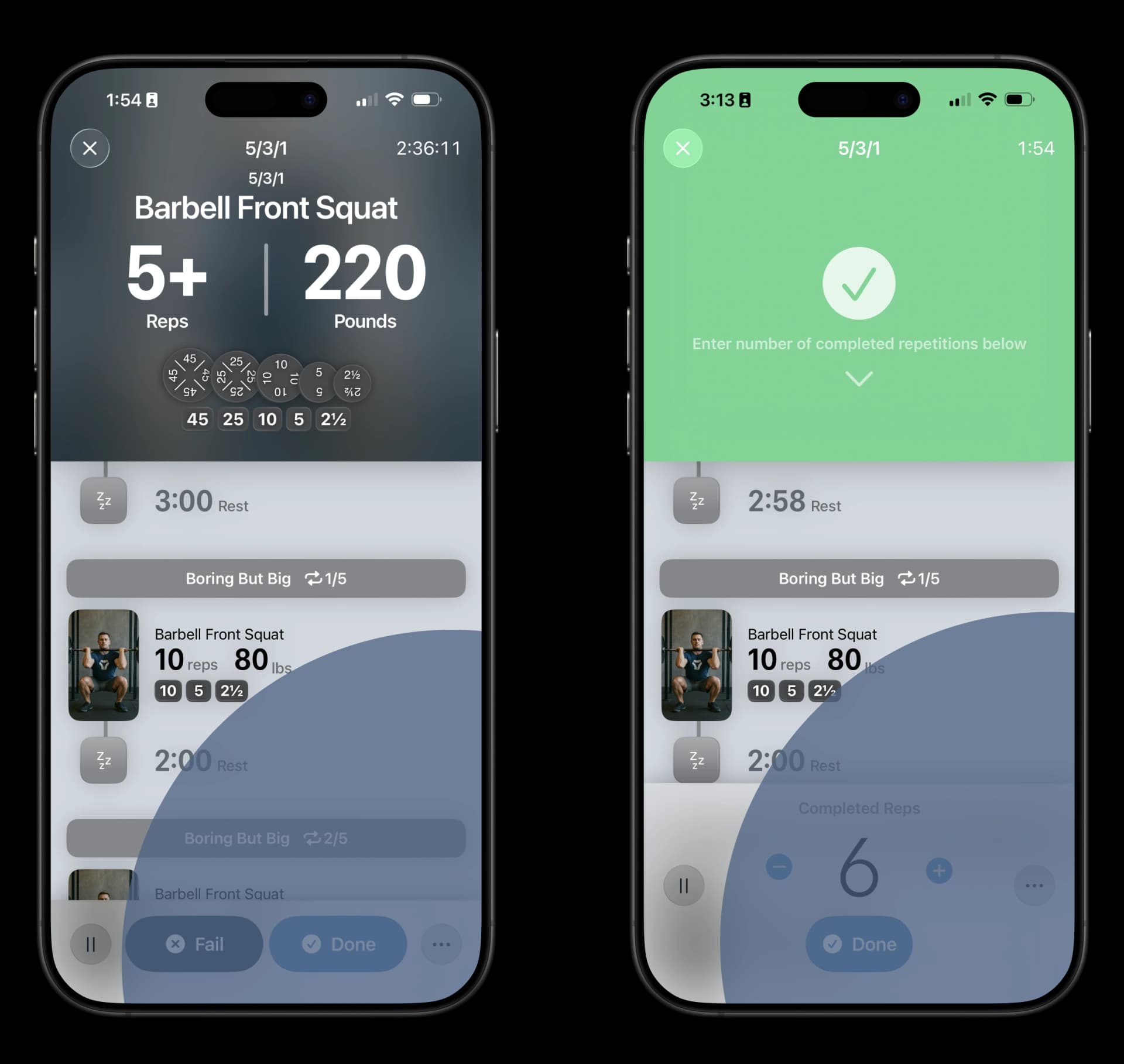
For the use case of looking at the upcoming sets, what we’ve found is that the information hierarchy shifts compared to when you’re mid-exercise. In this situation, users care first and foremost about the exercise, then the volume and load and finally the plating. Users especially care about how many sets of a certain exercise they have left.
To account for that, we’ve added redundancy to the presentation of the exercise by also adding a picture for it (if there is one), making it visually heavier. We’ve also made sure the number of rounds left is always displayed on each round header. The font size is bigger than the baseline for the volume and load, but smaller than the top box, making it easier to read at arm length. And lastly, to enable users to see even more sets at once, we’ve made it so that the upper part disappears as the user scrolls down the list, enabling them to get a bigger picture of the upcoming work.
We believe that optimizing for all of these near-field interactions makes our workout experience much more pleasant and results in quicker interactions, letting users focus more on their workouts. However, some interactions need the user’s full attention, which we address through the third class.
Designing for Full-Focus interactions
Some of the things users want to do are better done with the user’s full attention and with both hands. These interactions fall in what we call the full-focus class. The use cases that have such interactions are users looking at their progress and entire workout and users editing their workout.
As mentioned earlier, these interactions happen on a separate sheet. This allows us to have a page where the information is much denser and the font size is at the baseline. This way, the information doesn’t get out-competed for the user’s gaze by the bigger text. This higher density also allows us to tackle the user’s more complex needs.
For example, a common problem of gym users is needing to use a certain piece of equipment that is currently occupied. In those moments, users often rearrange their plan so they can keep training and return to that equipment later. For this scenario we’ve made it really easy for users to rearrange their workouts (and published an open-source library for it) around.
Another situation is when the user wants to modify their workout. While editing individual sets isn’t yet available (coming soon), the user can modify the workout parameters, enabling them for example to adjust the weight for a specific exercise.
Having all of these interactions happen on a separate sheet gives us room to grow to add other complex features that require the user’s full attention, without impacting the core experience.
Wrapping it up
As you can see, we’ve put a ton of thought into the design of Vis, focusing on the different ways users interact with their device and optimizing for each of those. We’ve spent hundreds of hours performing user research and iterating on our design until we landed on something that feels just right. We’re confident that Vis offers the most thoughtfully designed workout experience available, and we just can’t wait for you to try it.
This journey started with our belief that strength training deserves better tools. Now, we’re building them.